Lead Capture Automation: How Small Businesses Convert More Leads Without More Staff
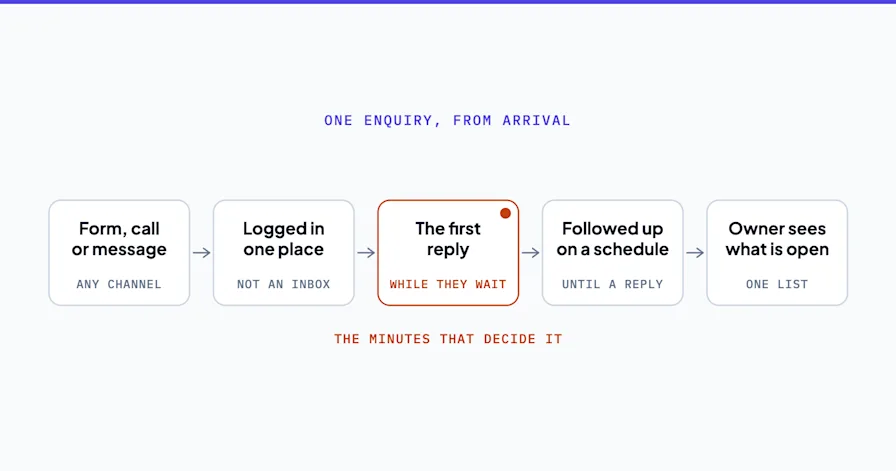
Here's the number that should change how you think about lead response: in the MIT/InsideSales.com Lead Response Management Study, businesses that called a new web inquiry within 5 minutes were 21x more likely to qualify that lead than businesses that waited 30 minutes. Not 21% more likely. 21 times.
For most small businesses, a 5-minute response isn't realistic when a human has to do it. The inquiry comes in at 2 PM. The owner is in a meeting. The office manager is on the phone. Someone checks the form submission at 4 PM. The follow-up goes out the next morning. By then, the prospect has already heard back from two competitors.
Lead capture automation solves the speed problem and the consistency problem simultaneously. Every inquiry gets an immediate response. Every lead gets qualified against your criteria. Every qualified lead gets routed to the right person with context. All of it happens without anyone on your team lifting a finger until there's a conversation worth having.
This guide covers how to build a lead capture automation system for a small business. Not an enterprise stack that costs more than the leads it brings in. The version that a company with 1 to 50 employees can actually run.
Want someone to design your lead capture system? Book a free Shortlist Call and we'll map your lead flow in 30 minutes.
Why Small Businesses Lose Leads (It's Not the Marketing)
Most small businesses that complain about lead quality actually have a lead handling problem, not a lead quality problem. The leads are fine. The system that processes them isn't.
Speed kills (slowly). A Harvard Business Review study of 2,241 U.S. companies found that among the companies that responded at all, the average took 42 hours, nearly two business days, to reply to a new online lead. Not 42 minutes. Hours. By then, the prospect has moved on. The marketing spend that generated the lead is wasted. Not because the ad didn't work, but because nobody followed up fast enough.
Inconsistency creates leaks. When lead follow-up depends on someone remembering to check a form, the conversion rate is a function of that person's workload. Good week: most leads get followed up. Busy week: half fall through. Vacation week: leads pile up. There's no system. Just effort.
Manual qualification wastes time on the wrong leads. Without pre-qualification, your sales team (or you, the owner) spends time on every inquiry equally. The tire-kicker who will never buy gets the same 15-minute call as the ready-to-sign prospect. Lead capture automation with AI qualification sorts them before a human gets involved.
The Lead Capture Automation System (5 Components)
A complete lead capture automation system has five connected components. Each one handles a specific stage of the lead journey from "just submitted a form" to "booked on the calendar."
1. Instant Response (0-2 Minutes)
When a lead submits a form, fills out a chat widget, or sends an inquiry email, the system responds immediately. Not a generic "we received your message" auto-reply. A contextual response that acknowledges what they asked about and sets expectations for next steps.
For a marketing agency, this might be: "Thanks for your interest in our SEO services, [name]. We've got a few quick questions to make sure we're a fit. You'll hear from our team within 4 hours with a personalized recommendation."
This response can be a template triggered by form submission (simple, free with most CRM tools) or an AI agent that generates a personalized reply based on the inquiry content (more sophisticated, better conversion rates).
2. AI Lead Qualification
Not every inquiry deserves a sales call. Lead capture automation includes a qualification step that filters leads before a human engages.
The qualification can be built two ways:
Form-based qualification. Your intake form includes 3-5 qualifying questions. Budget range, company size, timeline, specific need. The answers automatically score the lead and route it accordingly. High-score leads get immediate calendar links. Low-score leads get a nurture email sequence.
AI-powered qualification. An AI lead qualification agent reviews the inquiry, cross-references it against your ideal client criteria, and scores the lead based on multiple signals: what they asked about, their company size (pulled from public data), their urgency indicators, and their budget signals. This works better for businesses with complex or varied service offerings.
A small firm that adds AI lead qualification often finds a real share of its inbound inquiries come from businesses too small for its services. Before automation, a partner spent 15 minutes per call learning this. After: the AI qualification agent identified them before any human time was spent and routed them to a self-serve resource page.
3. Automated Lead Follow-Up
The first response is just the beginning. Most leads need 3-5 touches before they convert. Manual follow-up breaks at this scale.
Build an automated follow-up sequence tied to lead behavior:
Qualified lead, no booking: Day 1 (instant response) → Day 2 (case study or value-add content) → Day 4 (direct "still interested?" with calendar link) → Day 7 (final follow-up)
Unqualified lead: Nurture sequence with educational content that may qualify them later
Lead who clicked but didn't submit: Retargeting email or ad sequence
The key is that each touch adds value. A follow-up sequence that's just "checking in" three times gets ignored. A sequence that shares a relevant case study, then a useful resource, then a specific offer to help gets responses.
4. Calendar Routing
When a qualified lead is ready to talk, remove every friction point between "I'm interested" and "I'm on the calendar."
Embed your scheduling tool directly in the qualification confirmation. No "someone will reach out to schedule." No email ping-pong. The lead picks a time on your calendar within the same workflow that qualified them.
For businesses with multiple team members, route the booking based on the qualification data. Leads interested in SEO go to the SEO lead. Leads interested in accounting go to the relevant partner. Leads in a specific geographic area go to the local representative.
5. CRM Update and Team Notification
When a lead is captured, qualified, and booked, the system should update your CRM with the complete lead profile: source, qualification answers, AI scoring, follow-up history, and meeting details. Your team walks into the call with full context.
The notification to your sales team should include everything they need to prepare: the lead's inquiry, their qualification data, any relevant company information, and the meeting time. No pre-call research needed. The automation did it.
Building Your Lead Capture Automation Stack
Here's what the tool stack looks like at different budget levels:
The monthly figures below are what I have seen these tool stacks actually cost, from my own experience putting them together for small businesses. They are not vendor list prices.
Basic ($50-100/month)
Forms: Jotform or Typeform (free tier)
CRM: HubSpot free or Pipedrive ($15/user)
Automation: Zapier Starter ($20/month)
Scheduling: Calendly free tier
Email: Your existing email tool
This handles instant response (template-based), form-based qualification, basic automated follow-up, and CRM updates. Zapier connects the pieces. Good for businesses getting 10-30 leads per month.
Intermediate ($150-300/month)
Everything in Basic, plus:
AI qualification: Custom ChatGPT/Claude integration via Zapier or Make
Advanced follow-up: ActiveCampaign ($29/month) or similar for behavioral sequences
SMS: Twilio integration ($0.01/message) for text-based follow-up
This adds AI-powered lead scoring, multi-channel follow-up (email + SMS), and behavioral triggers. Good for businesses getting 30-100 leads per month.
Advanced ($300-500/month)
Everything in Intermediate, plus:
AI lead agent: Purpose-built agent that handles qualification conversations
Business process automation connecting lead capture to onboarding
Reporting dashboard: Automated lead conversion metrics
This is the full system. The AI agent has a real conversation with leads, qualifies them, books meetings, and hands off complete context. The lead capture system connects directly to the onboarding automation so won deals transition seamlessly.
Measuring Lead Capture Automation Performance
Track these four metrics monthly:
Speed to first response. Target: under 5 minutes. Before automation, most small businesses average 4-48 hours. After: seconds.
Lead-to-meeting conversion rate. What percentage of captured leads end up on the calendar? Most service businesses convert only a fraction, with plenty of interested people slipping through before anyone follows up. Consistent qualification and fast follow-up move that number up. Treat this as directional from what we see in the field, not a published benchmark, since conversion rates vary widely by funnel stage and definition.
Cost per qualified lead. Take your marketing spend, divide by the number of qualified leads (not total leads). Automation improves this metric by filtering unqualified leads before you spend sales time on them.
No-show rate. Automated confirmation and reminder sequences are one of the simplest ways to cut no-shows. A well-timed reminder keeps the meeting top of mind and prompts a quick re-confirm, so fewer people forget. That alone recovers significant selling time.
Review these metrics monthly. Lead capture automation should improve over time as you refine qualification questions, adjust follow-up timing, and optimize based on which messages get the best response rates. The system you build in month one won't be the same system running in month six. It'll be better.
The Speed-to-Lead Advantage
The 5-minute response window isn't just a nice-to-have. It's the single biggest lever most small businesses have in their sales process. And lead capture automation is the only way to consistently hit it without hiring someone to sit by the inbox 12 hours a day.
Think about your own behavior as a buyer. You submit a form on three company websites. One responds in 2 minutes with a helpful, personalized message and a link to book a call. The other two respond the next day with a generic "thanks for your interest." Which one gets the meeting?
That's the math. And it works in your favor when your AI agents handle the first response while your team focuses on the conversations that close deals.
The compound effect matters too. Faster response times don't just improve individual lead conversion. They change your reputation. Prospects who get instant, helpful responses tell their colleagues. Review sites capture the experience. Over six months, the speed advantage compounds into a brand signal: "these people are responsive and organized." That signal attracts better leads, which improves close rates, which grows revenue. All from an automation that cost $100/month to build.
Lead Capture Automation by Industry
Different businesses need different lead capture approaches. Here's what the system looks like for three common small business types.
Professional services (consulting, legal, accounting). The qualification criteria are specific: engagement size, industry, timeline, and budget range. A form-based qualification with 4-5 questions works well. The AI follow-up sequence should include a case study relevant to their industry. Calendar routing goes to the partner or consultant who specializes in their area.
Home services (HVAC, plumbing, electrical, landscaping). Speed matters more than qualification depth. Most leads are ready to buy now. The automation should focus on instant response with a scheduling link, not a multi-step qualification process. SMS-based follow-up outperforms email for this audience. The CRM should capture property address and service type for the dispatch team.
Agencies and creative services (marketing, design, development). The qualification needs to filter for budget and project scope. An automated portfolio delivery based on the prospect's stated needs (SEO, web design, branding) demonstrates capability before the first call. The follow-up sequence should include relevant work samples and a clear calendar link for a discovery call.
Conclusion
Lead capture automation isn't about generating more leads. It's about converting the leads you already have. Speed, qualification, consistent follow-up, and frictionless booking. Those four elements turn a leaky funnel into a system.
The businesses responding in 5 minutes instead of 5 hours aren't working harder. They built the system that works while they focus on clients.
Lead capture automation isn't a one-time project. As Monday.com's lead automation guide points out, the best-performing systems evolve monthly based on conversion data. What starts as a simple form-to-CRM connection in month one becomes a multi-channel, AI-qualified pipeline by month six.
Start with the basic stack ($50-100/month) if you're just getting started. Move to the intermediate or advanced tier when your lead volume justifies the investment. Or have someone design and build the system for you so you skip the learning curve.
The businesses winning on lead capture in 2026 aren't the ones spending the most on marketing. They're the ones who built the system that responds in 2 minutes instead of 2 days. That system is available to any small business willing to set it up.
Ready to stop losing leads to slow response times? Book a free Shortlist Call and we'll map your lead flow and show you where automation makes the biggest impact.
Stephen Angelo
Founder & CEO, OptiWork.ai