Automation Consultant vs DIY: What's Right for Your Small Business in 2026?
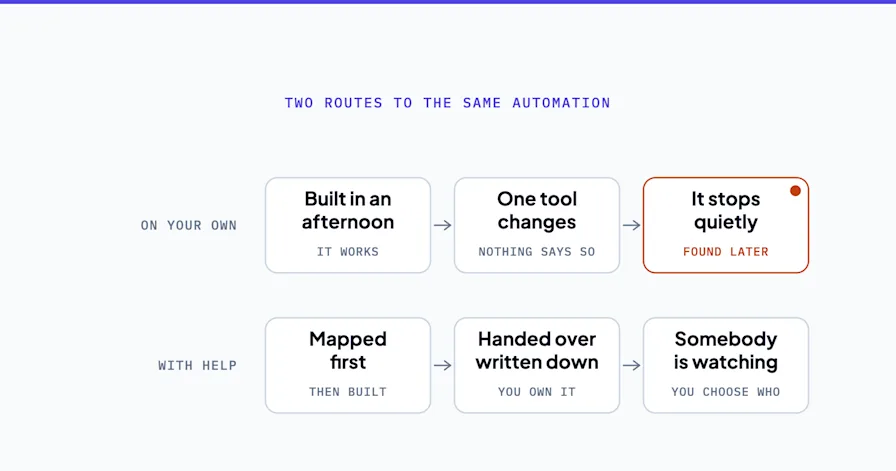
You can build a functioning automation with Zapier in an afternoon. That's not the question.
The real question in the automation consultant vs DIY decision is whether what you build will still be running in 18 months, survive a staff change, and actually fix the bottleneck you meant to fix. Most DIY builds don't.
DIY automation has gotten genuinely good. Zapier's AI Copilot, Make's visual builder, Lindy's natural-language agents. The tools are real, the learning curve is shorter than it used to be, and for a lot of small businesses they work fine. But the automation consultant vs DIY call isn't about which is better in the abstract. It's about what your specific business needs, what happens if it breaks, and who picks up the pieces when it does.
This guide gives you a decision framework with specific thresholds, the failure modes nobody warns you about, and a hybrid path most small businesses miss. No shaming of DIY. No inflated fear-marketing about consulting. Just the math.
Not sure which side of the line you're on? Book a free Shortlist Call. We'll tell you honestly whether your situation is DIY, consultant, or hybrid, no pitch required.
What You Can Actually Build Yourself (And Why It Often Works)
DIY automation works well in a predictable set of situations. If you're in any of them, you probably don't need a consultant yet.
Single-trigger, single-action workflows. A new form submission lands in Typeform, and you want it routed to Slack and added to a Google Sheet. That's a 30-minute Zap. Anyone with an afternoon and a coffee can set it up.
Simple internal notifications. A contact form on your website that sends you an email and creates a Trello card. Build it, test it, ship it.
Basic CRM or calendar syncs. Pushing new HubSpot contacts to Mailchimp. Blocking out calendar time when a Calendly appointment books. These are the kinds of jobs automation platforms were built for.
Here's an illustrative example of DIY working correctly. Picture a small creative agency that routes Typeform project intake submissions to Slack, then creates a draft project in Asana. Build time: an afternoon. Monthly cost: a standard Zapier subscription. The owner maintains it herself, and a setup like that can run quietly for a long stretch.
This is what DIY is good for. Don't pay a consultant to do this.
When DIY Works: The Honest Checklist
Single-trigger workflows (one thing happens, one or two things follow)
No compliance weight (not touching patient, financial, or cardholder data)
You or someone on your team has a few hours a month to maintain and tweak it
If the automation breaks, the worst case is a quick manual fix
The underlying process is already working well without automation
If all five are true, build it yourself. The tools are good enough now that you don't need to pay someone else to click the same buttons.
Where DIY Automation Predictably Breaks
The trouble starts when DIY gets pulled past its useful range. The failure patterns are remarkably consistent across small businesses.
You Automated a Broken Process (And Now It Breaks Faster)
This is the most common DIY disaster. The owner knows the intake process is messy. Someone reads half the form, assigns the wrong person, the lead sits for three days. Instead of fixing the process, they automate it.
Now the messy process runs at machine speed. Mis-routed leads accumulate in the wrong queue. The original three-day delay becomes three-hundred leads deep. The automation didn't fix anything. It industrialized the problem.
Most automation failures are not tool failures. They're workflow failures that software happened to expose.
The Tech-Savvy Employee Becomes a Single Point of Failure
Every small business has one. The ops manager who "gets" Zapier. The sales lead who built the email sequence. The junior who stitched together the reporting dashboard in Google Apps Script.
Then they leave. Or go on parental leave. Or move to a different role. And suddenly nobody knows why the weekly invoice reminder stopped firing, where the connection broke, or what that third zap in the chain is even supposed to do.
Picture a small services firm that has built a pile of Zaps over a couple of years. The operations manager owns all of them, documents none of them, and then leaves for a bigger company. Some of those Zaps can break silently, with nobody noticing until a customer does. By the time someone flags it, renewal reminders have gone unsent and a client who'd "been meaning to reach out" could already be gone. That's the single-point-of-failure tax, and it's a common one.
No Documentation, No Monitoring, No Recovery Plan
Enterprise IT treats automations as production systems with logs, alerts, and runbooks. DIY treats them as fire-and-forget Zaps.
When a DIY automation breaks, you usually find out days or weeks later, and only because a customer complained. A meaningful share of your "running" automations may actually be dead, and you have no way to know which ones.
Multi-System Workflows With Conditional Logic
Once a workflow has to ask if-then questions across three or more systems, DIY starts falling apart. Example: a new lead comes in, check if they're an existing customer in the CRM, if yes route to the account manager, if no check lead score, if high-priority send to Slack, if low-priority drop into the nurture sequence, and if the form mentioned a specific product tag the deal in HubSpot differently.
That's not a Zap. That's a small software product. DIY tools can technically build it. Maintaining and debugging it is another question.
Anything That Touches Regulated Data
Healthcare. Financial services. Legal. Credit card processing. Education records. Anything governed by HIPAA, PCI-DSS, SOC 2, FERPA, or GDPR.
Most DIY tools do not offer BAAs (Business Associate Agreements). Data flowing through a consumer-tier Zapier connection is probably not HIPAA-compliant. A DIY automation that touches patient data without the right safeguards isn't a productivity win. It's a regulatory liability.
DIY software implementations frequently stall or get abandoned partway through, leaving teams to fall back on the manual workarounds and old systems they were trying to replace. In compliance-sensitive environments, that risk climbs higher still.
What You're Actually Paying For With a Consultant
The automation consultant vs DIY cost comparison gets muddled when people assume the consultant's fee is paying for software setup. It isn't. You're paying for something different.
System design. The consultant's job is to map the workflow before touching a single tool. Where does work currently fall through cracks? What should trigger what? Who needs to approve what? This is architectural work that DIY users usually skip, which is why DIY automations fail so often.
Security and compliance layer. Deliberate security architecture for workflows that touch sensitive data. Zero-retention policies. Encryption standards. Proper BAA execution. This is non-negotiable in regulated industries and increasingly expected everywhere else.
Documentation and handoff. A good consultant leaves you with process maps, admin guides, and training so your team can maintain the system without the consultant. If the handoff doesn't exist, you didn't hire a consultant. You hired a dependency.
Avoiding the year-two rebuild. Most "we have to rebuild this" moments happen around month 18, when the business has grown past the original DIY scope and the duct tape is no longer invisible. A properly designed system scales. A DIY system usually hits a ceiling.
The real frame: you're not paying for software setup. You're paying for the architecture decisions that determine whether the system is still running in two years.
Want to see what a system-first engagement actually looks like? Our AI Strategy Consulting service starts with the workflow, not a tool pitch. We tell you what to automate, what to leave alone, and what order to build it in.
The Real Cost Comparison: Automation Consultant vs DIY
Cost is where the DIY vs consultant conversation gets distorted. Let's do the honest math.
DIY True Cost
Cash cost: the tool subscriptions themselves (Zapier, Make, ChatGPT Team, etc.), which is the small part
Build time: owner or operator time across the first months, and more of it than the tool demos suggest
Maintenance time: a recurring slice of someone's month thereafter
Opportunity cost: every build hour is an hour not spent on the work that brings money in
The tool cost is small. The time cost is what everyone forgets to price.
Consulting Cost for Small Businesses
Strategy-only engagement: a written roadmap without implementation
Full BPA implementation: design, build and handoff with a firm that works at small business scale
Ongoing optimization retainer: a monthly arrangement for continuous improvement
For a short, well-defined project, engaging an outside firm is often cheaper than standing up an in-house AI team. You pay for the work you need without carrying the fixed cost of full-time salaries, benefits, and overhead. The math flips as the engagement stretches on. A dedicated internal team can become more cost-effective once the work is continuous and long-running, so it's worth modeling both against your actual timeline.
The Math That Actually Matters
Put the two side by side for a realistic SMB scenario:
Path | Where the cost lands | What it asks of you | What decides the total |
|---|---|---|---|
Pure DIY | Tool subscriptions, and nothing else on an invoice | Owner and operator hours, heavy at the build, steady after | Whether the build survives the first real process change |
Full consulting | An invoice, quoted per engagement | Review time rather than build time | Scope, and how much of the workflow carries compliance weight |
Hybrid (recommended) | Part invoice, part internal time | Design bought in, maintenance kept in house | How much your internal owner can carry after handoff |
When the numbers are lined up honestly, DIY is rarely the cheap option people assume it is. It's just the option where the cost shows up as owner time instead of an invoice.
For a full breakdown of pricing by engagement type, see our AI consulting cost guide for small businesses.
Automation Consultant vs DIY: A Decision Framework (DIY, Consultant, or Hybrid)
Most articles on this topic force a binary answer. Reality has three paths. Here's how to pick.
Stay DIY if...
All your workflows are single-trigger, single-action
You have no compliance requirements
Someone on your team has documented Zapier or Make experience and a few hours a month to maintain
Your industry is simple (e.g., services, internal ops, basic lead routing)
Budget is genuinely zero and you value time over cash
Hire a consultant if...
You have multi-system workflows involving 3+ tools
You're in healthcare, legal, financial services, or any compliance-sensitive vertical
You need production-ready automation live in under 60 days
You've tried DIY and it broke in ways you can't diagnose
The workflow is central to revenue (lead-to-cash, onboarding, customer support) and downtime costs real money
You're scaling fast and need systems that won't re-break in six months
Go hybrid if...
You want consultant-level architecture without consultant-level ongoing costs
You have someone internal who can maintain systems but not design them from scratch
Your workflows are a mix of simple and complex
You want to learn the thinking, not just get a delivered solution
Hybrid is what OptiWork recommends for most small businesses. A consultant designs the core system, implements the compliance-critical pieces, documents everything, and trains the internal owner. From there, the internal team owns day-to-day maintenance and builds smaller Zaps as needs emerge.
A typical hybrid engagement follows this exact pattern. The consultant builds the core lead intake, document routing, and client onboarding automation. The internal ops manager then maintains the day-to-day, adds small Zaps as needs arise, and brings the consultant back periodically for a short review. For a professional services firm, the first year buys the architecture once and keeps the running cost inside the team.
How to Evaluate an Automation Consultant (If You Decide to Hire)
Not all automation consultants are equal. Some will do great work. Some will sell you software setup at architecture-level prices. Here's how to tell them apart.
Red Flags
They lead with a specific platform. If the first conversation is about Zapier, n8n, Make, or any other single tool, they're a platform partner, not an architect. Their recommendations will steer you toward their favorite vendor regardless of fit.
They quote you before understanding your workflow. A credible consultant wants to see how work moves through your business before talking price. If you can get a quote from a website form, you're about to hire a tool installer.
They skip the documentation and handoff conversation. If handoff isn't part of the scope, you're buying a dependency, not a system.
Security is an "add-on." Any firm that treats HIPAA, SOC 2, or basic security architecture as an upcharge is not ready for regulated work.
Green Flags
They ask to see your process before talking about tools. System first, software second.
They discuss what happens after handoff. Documentation, training, and maintenance are part of scope, not an afterthought.
They're vendor-neutral. Their recommendations vary by situation, not by their partnership agreements.
Security and compliance are built in. If you're in a regulated industry, they should be asking about your requirements before you ask them.
They've built workflows for businesses your size. Enterprise consultants who "also work with SMBs" rarely have the right playbook. You want someone who lives in the 1-100 employee range.
Our AI Strategy Consulting service is built on this model. The engagement always starts with the workflow, not a tool recommendation. And we're vendor-neutral by design, so if Zapier is the right answer for your situation, we'll tell you.
When DIY Is Actually the Right Answer
Not every business needs a consultant. Part of honest consulting is saying so.
DIY is genuinely the right call when:
The owner is technical and enjoys building systems. If you find workflow design interesting, the maintenance time investment is a feature, not a bug.
Workflows are simple and unlikely to grow in complexity. Some businesses have five automations that will remain five automations forever. Consulting would be overkill.
Budget is genuinely constrained. If the choice is DIY or nothing, DIY is the better option. An imperfect automation you own is worth more than the perfect one you can't afford.
You're in the learning phase. Sometimes the right move is to build two or three Zaps yourself, get a feel for what's possible, and then bring a consultant in once you know what questions to ask.
Consulting has a floor. Below a certain complexity threshold, the overhead isn't justified. Any consultant who won't tell you that is not someone you should hire.
Frequently Asked Questions
When should I hire an automation consultant? Hire a consultant when you have multi-system workflows (3+ tools connected), compliance requirements, need production-ready automation in under 60 days, or have already tried DIY and had it break. Below that threshold, DIY is usually fine.
How much does an automation consultant cost for a small business? It depends on what you are buying. A strategy-only roadmap is the smallest commitment, a full business process automation build is the largest, and an ongoing optimization retainer sits between them as a monthly arrangement. Enterprise consulting costs far more and is almost never right-sized for 1-100 employee businesses. OptiWork quotes its own work per engagement and publishes its starting points on the pricing page.
Can I just use Zapier instead of hiring a consultant? For simple, single-trigger workflows, yes. Zapier is a fine DIY tool with real AI-assisted features now. But Zapier is a platform, not a strategy. If your workflow involves multiple systems, conditional logic, or compliance, the platform isn't the bottleneck. Workflow design is.
What's the difference between an automation consultant and a developer? A developer writes code. An automation consultant designs the workflow before writing anything, evaluates whether code is even needed, and makes the call between no-code platforms, custom development, or a hybrid. Hiring a developer without workflow design first usually produces software that automates the wrong thing.
How do I know if my workflow is too complex for DIY? Apply three tests. First, does the workflow touch more than three systems? Second, does it require conditional logic (if-then branching)? Third, does any part of it involve regulated data (HIPAA, PCI, SOC 2)? If you answered yes to any of these, you're past the DIY line.
Automation Consultant vs DIY: Key Takeaways and Next Steps
The automation consultant vs DIY decision isn't about which side is better. It's about matching the path to your situation.
DIY works well for simple, single-trigger workflows with no compliance weight. Don't pay a consultant for 30-minute Zaps.
DIY predictably fails at multi-system workflows, regulated data, and workflows that outgrow their original scope. When it fails, the cost is usually silent until something breaks in production.
The real consulting cost is not software setup. It's system design, security architecture, documentation, and handoff. That's what makes a system still run in two years.
Hybrid is the default answer for most small businesses. Consultant architects the core, internal team maintains and extends. Lowest total cost, highest long-term durability.
Start with the workflow, not the tool. If a consultant leads with a platform or a developer leads with code, they're solving the wrong problem.
If you're not sure which path fits your situation, the fastest way to find out is a 30-minute call with someone who isn't trying to sell you a specific tool. Book a free Shortlist Call and we'll give you a straight answer: DIY, consultant, or hybrid. No pitch, no pressure, no obligation. If DIY is right, we'll say so and point you toward the resources you need.
Most small businesses lose real hours every week to work that shouldn't require a human. The path to getting that time back starts with matching the right solution to the right problem. Not with buying the most impressive tool on the market.
Sources: Zapier documentation
Stephen Angelo
Founder & CEO, OptiWork.ai