AI Agent vs Chatbot: What Small Businesses Actually Need
Every vendor in the AI space is calling their product an "agent" now. That includes tools that are absolutely not agents. Some are glorified FAQ bots dressed up with a chatbot window and an AI logo. Others are genuinely capable systems that can take action in your business without you telling them what to do every step of the way.
If you're a small business owner trying to figure out which one you actually need, the terminology isn't helping you. So let's cut through it.
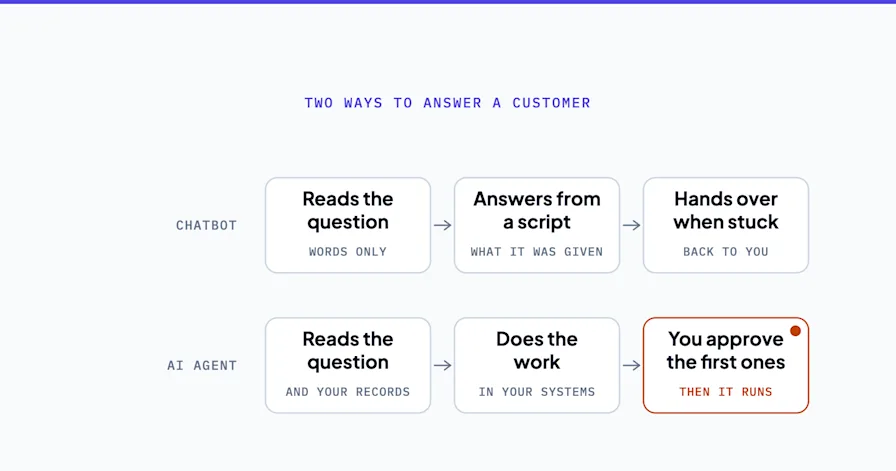
The AI agent vs chatbot question matters because the answer changes what you build, what you spend, and what you get. A chatbot handles a conversation. An AI agent handles a workflow. Those are different things, and confusing them wastes both money and time.
This article breaks down what each one actually is, where the line between them falls, and how to figure out which is the right fit for your business right now.
Want to skip straight to figuring out your options? Book a free Shortlist Call and we'll map out exactly what makes sense for your operation.
What a Chatbot Actually Is
A chatbot is software that simulates a text-based conversation. You ask it something, it replies. Most of the chatbots businesses use today fall into two categories:
Rule-based chatbots follow a decision tree. If the user says X, respond with Y. They're deterministic: the same input always produces the same output. They're cheap to build, easy to manage, and brittle the moment a user says something unexpected.
AI-powered chatbots use a language model to generate responses dynamically. They can handle more variation in how questions are phrased, produce more natural-sounding answers, and handle topics outside a rigid script. Tools like Intercom, Drift, and basic ChatGPT-based customer service widgets fall here.
Here's what both types have in common: they respond, but they don't act.
A chatbot can tell a customer their order is delayed. It cannot actually reschedule the delivery, update the shipping system, or notify your fulfillment team. The conversation ends, and then a human has to do something with it.
That's not a flaw. For some use cases, that's exactly right. But it's worth being clear about what you're getting.
Where Chatbots Work Well
Chatbots are a good fit when the goal is information delivery or conversation routing:
Answering common questions (hours, pricing, FAQs)
Collecting initial contact information before handing off to a human
Guiding visitors to the right page or resource
Providing 24/7 availability for basic support without a live agent
A three-person accounting firm that gets the same 12 questions from prospects every week is a reasonable chatbot candidate. Put a chatbot on the website, answer those 12 questions automatically, and the owner stops losing 2 hours a week to initial inquiries.
That's a real win. But it's not an AI agent.
What an AI Agent Actually Is
An AI agent is a system that can take action, not just respond. It perceives its environment, makes decisions based on a goal, and executes steps across tools and systems to accomplish that goal, often without waiting for human approval at each step.
The key distinction is autonomy and multi-step execution.
Where a chatbot ends at the conversation, an AI agent begins there. It takes what the conversation produced and does something with it: books the appointment, updates the CRM record, sends the follow-up email, creates the task in the project management system, and flags the deal as active.
A useful way to think about it: a chatbot is a customer service rep who takes your order and writes it on a notepad. An AI agent is a customer service rep who takes your order, enters it in the system, alerts the kitchen, processes your payment, sends your receipt, and schedules your delivery, all before you've put your phone down.
The Technical Differences (Without the Jargon)
An AI agent operates with a few capabilities that a standard chatbot doesn't have:
Tool use: Agents can call external APIs and services. They can look something up in your CRM, add a row to a spreadsheet, or send an email without being explicitly told to do each step.
Memory: Agents maintain context across interactions. They remember what happened in the last session, what stage a lead is at, or what a customer ordered before.
Planning: Given a goal, an agent can figure out the sequence of steps to accomplish it. It doesn't need a rigid script for every scenario.
Feedback loops: Agents can check whether an action succeeded and adjust if it didn't. A chatbot sends a message and stops. An agent checks if the message was received, and if not, tries an alternate channel.
According to Gartner, intelligent agents capable of autonomous decision-making represent one of the most significant shifts in enterprise software this decade. These capabilities are what make custom AI agents genuinely different from a customer-facing chat window. They're closer to a workflow system with judgment built in.
AI Agent vs Chatbot: Head-to-Head Comparison
Feature | Chatbot | AI Agent |
|---|---|---|
Interaction type | Conversation | Action + conversation |
What it does | Responds to questions | Executes workflows |
System access | Usually none | CRM, email, calendar, databases |
Autonomy | Low: follows script or responds | High: plans and acts toward a goal |
Memory | Usually per-session only | Persistent across interactions |
Setup complexity | Low to medium | Medium to high |
Best for | FAQs, routing, basic support | Lead qualification, automation, operations |
Failure mode | Breaks on unexpected input | Requires careful prompt and workflow design |
Cost to implement | Lower | Higher upfront, higher ROI |
The table oversimplifies some of this, because "AI agent" covers a wide range. A simple agent that just books appointments via a calendar API is far less complex than an agent managing your entire lead pipeline. But the directional comparison holds.
Where Things Get Blurry
The vendor landscape is not helping with clear definitions. Many products marketed as "AI agents" are actually AI-powered chatbots with some structured workflow features bolted on. Others described as "chatbots" are doing things that look a lot like agent behavior.
A few signals that something is actually an agent and not just a smarter chatbot:
It takes action in other systems without you approving each step
It can handle a goal across multiple sessions, not just one conversation
It adapts its approach when a step fails
You can give it a high-level objective ("qualify this lead and schedule a call if they're a fit") and it figures out the path
If the thing you're looking at just generates text responses in a chat window, it's a chatbot. It might be a very good chatbot, but that's what it is.
When a Chatbot Is the Right Call
Not every problem needs an agent. Here are the scenarios where a chatbot is the appropriate choice for a small business:
High volume of repetitive questions: If 60% of your inbound messages are variations of the same five questions, a chatbot that handles those frees up your team for everything else. You don't need an agent to tell someone your return policy.
First-touch lead capture: A chatbot can collect name, email, company size, and problem statement, then hand off to a human or a CRM. That's a legitimate use case that doesn't require full agent capabilities.
24/7 coverage without complexity: If the goal is simply "someone should be available to respond after hours," a chatbot accomplishes that at a fraction of the cost of an agent.
Budget is constrained: Chatbots are cheaper to implement and maintain. If you're in the early stages of automating your business, a chatbot on your website might be the right first step before investing in a full agent system.
Erin runs a boutique event planning business. She was spending 90 minutes a day answering the same initial inquiry questions from potential clients. Budget, timeline, headcount, event type. She added an AI-powered chatbot to her site that walks visitors through those questions, collects the answers, and emails her a summary. She now reviews a structured intake form instead of playing phone tag. Total setup time: a weekend. The chatbot doesn't book anything or update any systems. It just collects and delivers. That's the right tool for that problem.
When AI Agents Are Worth the Investment
Agents make sense when the work you're trying to automate involves multiple steps, multiple systems, or decisions that depend on context.
Lead qualification and follow-up: An agent can receive a new lead from a form, look them up against your ICP criteria, check if they're already in your CRM, send a personalized intro email, schedule a discovery call based on mutual availability, and create a task for your account team. All without a human touching it. A chatbot can do none of that.
Customer onboarding sequences: When a new client signs up, an agent can trigger the onboarding email sequence, create their account in your project management system, assign the right team members, generate the initial questionnaire, and set reminders for key milestones. One trigger, a dozen coordinated actions.
Internal operations: Agents aren't just for customer-facing work. Invoice follow-up, timesheet reminders, vendor communication, report generation. Any recurring operational task that involves pulling data from one place and doing something with it is a candidate.
Appointment-based businesses: Scheduling, rescheduling, pre-appointment reminders, post-appointment follow-up, review requests. A well-built agent handles the entire lifecycle of a client appointment without any manual steps.
Carlos runs a 7-person physical therapy practice. Between intake paperwork, insurance verification, appointment reminders, and post-visit follow-up surveys, his front desk was spending about 3 hours a day on administrative tasks that could be systematized. An AI agent now handles intake routing, sends reminder messages across SMS and email, and triggers the follow-up survey automatically after each appointment is marked complete. Front desk time on those tasks dropped to about 25 minutes. The agent doesn't replace the front desk. It gives them back time for the work that actually requires a person.
The Real Cost Comparison
This is where small business owners often get surprised, in both directions.
Chatbot costs: Basic chatbot tools run $50-300/month for most small businesses. Building a custom chatbot using a platform like Intercom or Tidio with AI features is usually $100-500/month depending on conversation volume. One-time build costs are low.
AI agent costs: This varies considerably. A simple agent built on top of existing tools (using Make or Zapier with an AI component) might cost $200-500 to set up and $50-150/month to run. A custom-built agent with more complex logic, multi-system integrations, and persistent memory could run $3,000-10,000 to build and $200-500/month to maintain.
McKinsey estimates that generative AI could automate 60-70% of employee time currently spent on knowledge work tasks. The ROI calculation changes the picture. A chatbot that saves 5 hours a week of FAQ handling is worth something. An agent that replaces 15 hours a week of manual lead follow-up and qualification is worth considerably more, particularly if those recovered hours translate to more closed deals or better client service.
The question isn't "which is cheaper?" but "which one solves the actual problem, and what's that worth?"
If you're not sure how to run that calculation for your specific situation, an AI strategy session is designed to answer exactly that question.
How to Decide Which One You Need
Work through these questions:
1. Does the outcome of the interaction require action in another system? If yes, you need at minimum a chatbot connected to a workflow tool, or an agent. If no, a standalone chatbot probably works.
2. How many steps does the complete process involve? One or two steps (collect info, send to email): chatbot territory. Four or more steps across multiple systems: agent territory.
3. Does the system need to make decisions based on context? If the same input should produce different outputs depending on who the person is or what's happened before, you need an agent.
4. What's the volume? If you're handling 5 leads a week manually, the ROI of an agent might not justify the build cost yet. If you're handling 50 or more and drowning in follow-up, agents pay back fast.
5. What's the cost of a missed step? If a lead doesn't get followed up with, they go to a competitor. If an appointment doesn't get a reminder, it's a no-show. High cost of failure justifies more investment in automation.
Most small businesses that come to us for help need both. A chatbot handles the initial website conversation and qualification. An agent handles everything that happens after the visitor converts into a contact. The two tools complement each other. They're not really competing.
For a step-by-step look at how to sequence your automation investments, the AI implementation framework is a useful starting point.
What "Custom AI Agents" Actually Means for Small Business
When vendors talk about custom AI agents, they often mean one of three things:
Pre-built agent templates: Tools like Lindy.ai, Relevance AI, or AgentGPT offer agents you can configure from a template. These are faster to deploy but less flexible. They work well if your workflow fits their assumptions.
Platform-connected agents: Agents built on top of automation platforms like Make, Zapier, or n8n. These are more flexible, since they connect to any tool those platforms support, but they require more design work to build well.
Fully custom agents: Built from scratch using frameworks like LangChain or AutoGen with direct API integrations. Most capable, most expensive to build, requires ongoing technical maintenance.
For most small businesses, the second category is the right starting point. Platform-connected agents give you genuine multi-step automation without the build cost of a fully custom system. As your needs grow or your workflows get more complex, custom builds become a real option.
The right architecture depends on what you're trying to automate and what tools you're already using. That's not a question with a universal answer. It's one that requires looking at your specific stack and workflows, which is what we do in a free Shortlist Call.
The Practical Starting Point for Most Small Businesses
Here's what we typically recommend when a business is at the "chatbot vs agent" decision point:
Start with the problem, not the technology. What task is eating the most time? What's causing leads to fall through? What's the most painful manual process? That answer usually points to the right tool without needing to know the technical differences in advance.
Don't overbuild for where you are. If a chatbot solves 80% of the problem, start there. Layer in agent capabilities as the complexity of your needs grows. Starting with a simple win and expanding is better than building a complex system that's hard to maintain.
Don't underbuild if you need action. If the bottleneck is that nothing happens after a lead comes in unless someone manually does it, a chatbot will not fix that. You need something that acts.
The good news is that the line between these tools is getting easier to navigate. Most modern platforms let you start with a chatbot and add agent functionality incrementally. You don't have to make a permanent choice on day one.
What you do need is a clear picture of your current workflows, your tool stack, and where the friction is. From there, the right architecture becomes obvious pretty quickly.
Bottom Line
The AI agent vs chatbot question isn't really a technology debate. It's a workflow question. What does your business need the automation to do, and what happens after the conversation ends?
If the answer is "answer questions and collect information," a chatbot is right. If the answer is "take action across my systems based on what the conversation produced," you need an agent.
Most businesses eventually need both. The chatbot handles the front door. The agent handles everything inside.
If you're trying to figure out which one makes sense for your operation right now, we can map it out in 30 minutes. No obligation, no sales pitch. Just a clear picture of what would actually move the needle for your business.
Book your free Shortlist Call and we'll build the roadmap together.
Frequently Asked Questions
What is the main difference between an AI agent and a chatbot?
A chatbot responds to questions within a conversation. An AI agent takes action across systems based on a goal. Chatbots deliver information; agents execute workflows. The difference matters because only one of them can actually move work forward without a human intervening.
Can a chatbot become an AI agent?
Not exactly. Some chatbot platforms let you add workflow automation features that give the bot limited agent capabilities, like booking a calendar slot or adding a contact to a CRM. But a true AI agent can plan, adapt, and act across multiple systems without a rigid script. Most chatbot tools don't cross that threshold even with integrations added.
Are AI agents right for small businesses or just enterprises?
Both. Enterprise AI agents tend to be more complex and expensive to build, but the same underlying capability is available to small businesses through platforms like Make, Zapier, and purpose-built agent tools. The scale is different. The approach is the same.
How much do AI agents cost for small businesses?
It depends heavily on complexity. A simple agent built on automation platforms runs $200-500 to set up and $50-150/month to operate. Custom-built agents with more sophisticated logic cost more. The ROI depends on what the agent replaces. Most agents targeting high-volume repetitive work pay back the build cost within three to six months.
What's a realistic first AI agent for a small business?
Lead follow-up is the most common starting point. When a contact form is submitted, an agent qualifies the lead against your criteria, adds them to your CRM, sends a personalized intro email, and books a discovery call if they're a fit. That one workflow typically recovers 3-5 hours a week for businesses doing any real volume of inbound leads.
Stephen Angelo
Founder & CEO, OptiWork.ai
You Might Also Like
Best Practices
AI Automation Agency vs. AI Consultant: Which Does a Small Business Need?
August 20, 2026
Best Practices
How a Custom AI Customer Service Agent Handles Support (With Practical Examples)
June 24, 2026
Best Practices
Automation Consultant vs DIY: What's Right for Your Small Business in 2026?
June 24, 2026