Customer Onboarding Automation: Step-by-Step for Small Business
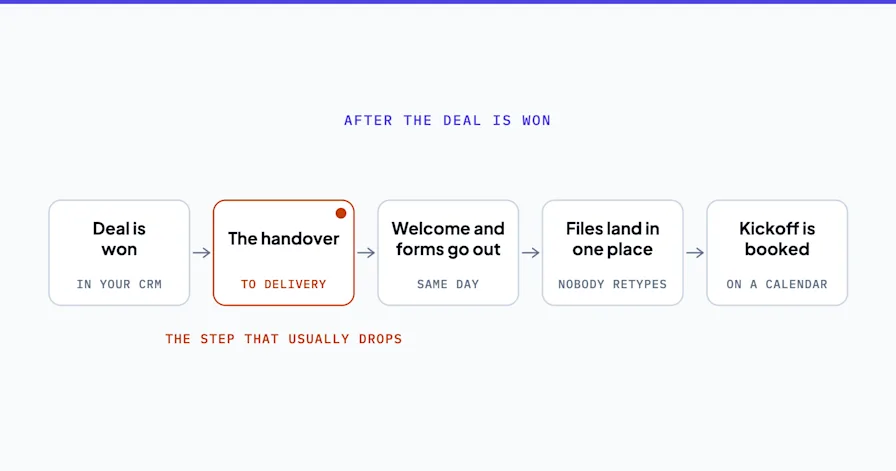
The moment between "yes, let's work together" and the first real interaction with your product or service is where most small businesses lose momentum. A new client signs. Then the welcome email goes out late. The intake form sits in a draft folder. The first meeting gets scheduled a week later than it should. By the time the engagement actually starts, the excitement has cooled.
Customer onboarding automation fixes this by turning that critical handoff into a system instead of a checklist that depends on someone remembering every step. When you automate client onboarding, the intake form goes out within minutes of signing, the scheduling link arrives in the same email, and the internal team gets notified with full context before anyone has to think about it. For small businesses, where the founder or a single operations person IS the onboarding process, automation means the new client experience runs the same way every time, whether you're onboarding one new client this week or five.
But most onboarding automation content is written for SaaS companies with dedicated customer success teams. If you're running a consulting firm, an agency, a healthcare practice, or a local service business, those guides don't map to your reality. This one does.
Want someone to design your onboarding automation? Book a free Shortlist Call and we'll map your specific onboarding process in 30 minutes.
What Customer Onboarding Automation Actually Means for Small Business
Customer onboarding automation is the use of connected tools and workflows to handle the repeatable steps of bringing a new client into your business. Intake forms, welcome sequences, document collection, access provisioning, scheduling, and payment setup, all triggered automatically when a new client says yes.
For a SaaS company, onboarding means in-app walkthroughs and product tours. For a service business, it means something completely different. It means getting the signed agreement, collecting the information you need to start the work, scheduling the kickoff, and making the client feel like they made the right decision. All of that can be automated.
What stays manual is the relationship. The kickoff call itself. The strategic conversation. The parts of onboarding that require your judgment and expertise. Customer onboarding automation handles everything around those moments so you can focus on the moments themselves.
The Onboarding Handoff Problem
Every service business has a version of this problem. A sale closes. The client is ready to go. And then... nothing happens for 48 hours because the salesperson needs to brief the delivery team, the intake form needs to be sent manually, and the scheduling link lives in someone's email signature.
That gap costs you. Not just in client satisfaction (though it costs you there too). It costs you in real operational time. A marketing agency owner tracked her team's onboarding activities for a month and found that each new client consumed 3.5 hours of manual admin work spread across the first week. Multiply that by 8 new clients per month and you've got 28 hours of admin that could be automated.
The handoff problem has three failure points:
Information transfer. The sales conversation captured details (goals, budget, timeline, preferences) that need to reach the delivery team. Without a system, those details live in a CRM note that nobody reads or a Slack message that gets buried.
Document collection. Signed agreements, tax forms, brand guidelines, access credentials. Each one requires a separate email, a separate follow-up, and a separate check to confirm it was received.
Scheduling. The first meeting, the kickoff call, the strategy session. Manual scheduling adds 2-4 rounds of email back-and-forth per client.
Automating each of these eliminates the gap and creates a consistent experience that scales with your client volume.
Step-by-Step: Building Your Customer Onboarding Automation
This framework works for service businesses with 1-50 employees using standard tools (CRM, email, calendar, document management). No enterprise software required.
Step 1: Map Your Current Onboarding Process
Before automating anything, write down every step that happens between "client says yes" and "first real work begins." Include who does each step, how long it takes, and what tools are involved.
Most small businesses discover 8-15 discrete steps in their onboarding. At least half of those are pure admin: sending emails, creating folders, updating the CRM, scheduling meetings, collecting documents.
Step 2: Identify the Trigger
Every customer onboarding automation starts with a trigger event. For most service businesses, this is one of three things:
A deal moves to "Closed Won" in your CRM
A signed proposal or agreement is received (via DocuSign, PandaDoc, or similar)
A payment is processed
Pick one. This is the event that kicks off the entire automated sequence.
Step 3: Build the Welcome Sequence
When the trigger fires, three things should happen within minutes:
Welcome email. Personalized with the client's name and the specific service they purchased. Includes next steps and what to expect. This isn't a generic "thanks for signing up" email. It's a specific, useful message that answers the questions every new client has: "What happens now? When will I hear from you? What do I need to do?"
Intake form. A structured form that collects everything your team needs to start the work. For an accounting firm, that's access to bookkeeping software, prior tax returns, and entity information. For a marketing agency, it's brand guidelines, login credentials, and campaign objectives. Send this automatically as a link in the welcome email.
Scheduling link. Embed your scheduling tool (Calendly, Acuity, or your calendar system) directly in the welcome email. The client books their kickoff call without the back-and-forth.
Step 4: Automate Document Collection and Follow-Up
The intake form and document collection are where onboarding stalls for most businesses. Clients forget. Life gets busy. Without follow-up, documents trickle in over weeks.
Build an automated follow-up sequence:
Day 1: Intake form sent (triggered by the event in Step 2)
Day 3: If intake form not completed, send reminder with a direct link
Day 5: Second reminder, slightly different message
Day 7: Alert to your team that manual follow-up is needed
This keeps the process moving without anyone on your team remembering to check. Zapier's client onboarding guide covers the technical setup for connecting these tools.
Step 5: Automate Internal Setup
When the intake form is completed, trigger the internal steps:
Create a project folder (Google Drive, Dropbox, or your file system)
Create a project in your PM tool (Monday, Asana, or similar) with template tasks
Notify the delivery team with client details pulled from the CRM and intake form
Update the CRM record with onboarding status
Each of these can be automated with Zapier, Make, or direct API connections. The goal is zero manual data transfer between systems.
Step 6: Automate the Kickoff Confirmation
When the client books their kickoff call (from the scheduling link in Step 3), trigger:
A confirmation email with meeting details, agenda, and any pre-work
A calendar event for the delivery team with all client context attached
A Slack/Teams notification to the assigned team member
By the time the kickoff call happens, everyone on your team has context and the client feels like they're working with a professional operation. Because they are.
What This Looks Like End-to-End
Here's the complete sequence for a consulting firm:
Client signs proposal in PandaDoc → Trigger fires
Welcome email sends automatically (within 2 minutes)
Client receives intake form link + scheduling link
Client completes intake form → Google Drive folder created, project created in Asana, team notified
Client books kickoff call → confirmation email with agenda sends, team calendar updated
If intake form not completed by Day 3 → automated reminder
Kickoff call happens → team has full context without asking client to repeat anything
Total manual time: the kickoff call itself. Everything else runs automatically.
Compare that to the previous process: 3.5 hours of manual admin per client spread across the first week, with at least one missed step per 5 clients.
Tools That Work for Small Business Onboarding Automation
You don't need an enterprise onboarding platform. You need connected tools.
Function | Tool Options | Monthly Cost |
|---|---|---|
CRM | HubSpot (free tier), Pipedrive ($15/user), Salesforce Essentials ($25/user) | $0-75/mo |
Proposals/Agreements | PandaDoc ($19/mo), DocuSign ($10/mo) | $10-19/mo |
Forms | Jotform (free tier), Typeform ($25/mo) | $0-25/mo |
Scheduling | Calendly (free tier), Acuity ($16/mo) | $0-16/mo |
Automation | Zapier ($20/mo), Make ($9/mo) | $9-20/mo |
Project Management | Monday ($9/seat), Asana (free tier) | $0-27/mo |
Total for a complete onboarding automation stack: $19-182/month. Compare that to 3.5 hours of manual admin per client at $50/hour effective cost. Two new clients per month and the stack pays for itself.
For businesses that want the automation designed and built professionally, the implementation typically takes 1-2 weeks with ongoing monitoring included.
The investment pays for itself quickly. If your team spends 3.5 hours per new client on manual onboarding admin, and you onboard 8 new clients per month, that's 28 hours. At $50/hour effective cost, that's $1,400/month in admin time. Even the most expensive tool stack on this list costs a fraction of that. And the professional build pays back within the first month of operation.
Measuring Customer Onboarding Automation Success
Three metrics tell you if your customer onboarding automation is working. According to Lindy.ai's onboarding research, companies that automate onboarding see 16% higher customer retention rates and significantly faster time-to-value.
Time to first value. How many days between "client signs" and "first real work begins"? Before automation, this is typically 5-10 business days for service businesses. After: 1-3 days. The reduction comes from eliminating the admin lag.
Completion rate. What percentage of clients complete the intake process within 5 business days? Before automation: 60-70%. After, with automated reminders: 85-95%.
Team time per client. How many minutes of manual admin does each new client require? Before: 3-5 hours. After: 15-30 minutes (mostly the kickoff call prep and review).
Client satisfaction signals. Track whether onboarding-related questions decrease after automation. If clients stop asking "what do I do next?" and "when is our first meeting?", the system is working. You can also measure NPS or satisfaction scores specifically at the 2-week mark to capture the onboarding experience before it blends into the broader engagement.
Don't measure just once. Check these metrics monthly for the first quarter, then quarterly after that. Customer onboarding automation should improve over time as you refine the sequences based on what clients actually do versus what you expected them to do.
Conclusion
Customer onboarding automation isn't about replacing the personal touch in your client relationships. It's about making sure the personal touch isn't buried under 3 hours of admin work that could have happened automatically.
The 7 workflows every small business should automate guide ranks onboarding as one of the highest-ROI automation opportunities for service businesses. And the implementation is straightforward: a trigger event, a welcome sequence, automated document collection, and internal setup that runs without manual intervention.
Your clients notice when onboarding is smooth. They also notice when it isn't. And in a market where switching costs are low and competitors are a Google search away, the first impression you make after the sale often determines whether the relationship lasts.
The difference between a 3-hour manual onboarding process and a 30-minute automated one isn't just efficiency. It's the signal you send to new clients about how their entire engagement will feel. And that signal sets the tone for everything that follows. A well-designed automation system tells your clients: we have our act together. The manual version tells them: we're figuring it out as we go.
Ready to automate your onboarding process? Book a free Shortlist Call and we'll map your specific onboarding workflow, identify the highest-impact automation steps, and give you a build plan in 30 minutes.
Stephen Angelo
Founder & CEO, OptiWork.ai