Automate Business Workflows: 7 to Start With First
You already know your business has workflows that should be automated. The inbox triage that eats the first hour of every Monday. The lead follow-up that depends on someone remembering to send a second email. The invoice that sits in a draft folder until someone asks about payment.
The question isn't whether to automate business workflows. It's where to start. Digital Journal reports that small business owners spend 68% of their time on administrative tasks rather than revenue-generating activities. That ratio is fixable.
Not all workflows deliver the same return. Some save minutes. Others save entire roles' worth of capacity. This guide ranks the 7 workflows that consistently deliver the fastest, most measurable ROI for small businesses with 1 to 100 employees. If you want someone to identify the highest-impact workflows for your specific operation, book a free Shortlist Call.
How to Pick Which Business Workflows to Automate First
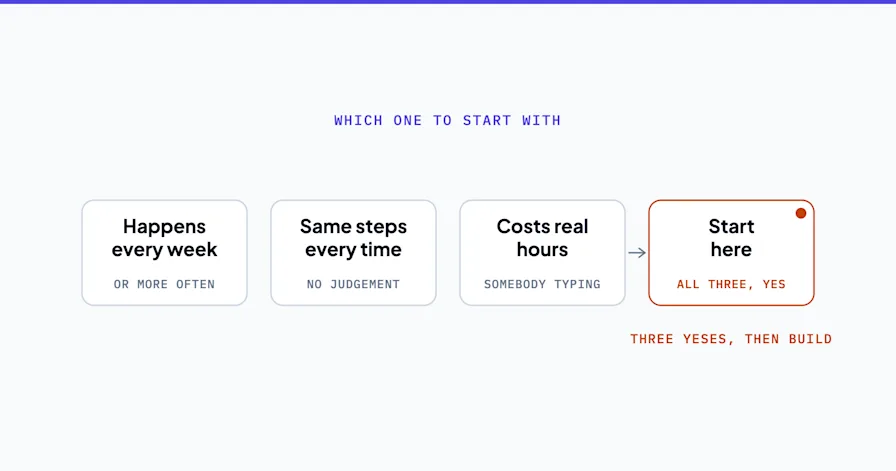
Before jumping into the list, here's the filter. Every workflow worth automating passes three tests.
Frequency. Does this workflow run at least 5 times per week? Daily processes have higher automation ROI than monthly ones. A lead follow-up sequence that triggers 20 times a week delivers more value than a quarterly report.
Time cost. Does the manual version consume more than 30 minutes per occurrence? Multiply that by frequency and you'll see the real cost. A 15-minute invoicing task that runs 10 times per week is 2.5 hours. Across your team, that adds up fast.
Revenue impact. Does this workflow touch leads, payments, or customer retention? Workflows that directly affect whether you get paid or whether a prospect becomes a client should always rank higher than internal convenience automations.
If a workflow scores high on all three, automate it first. Here are the seven business workflows that score highest for most small businesses.
1. Lead Capture and Follow-Up
The problem: Leads arrive through your website, email, phone, and social channels. Without a system, they sit until someone manually checks each channel, triages the inquiry, and sends a response. By then, the prospect has already contacted your competitor.
What the automated workflow does:
Captures leads from every channel into one place (your CRM or a central inbox)
Sends an immediate acknowledgment within seconds
Routes the lead to the right team member based on service type or geography
Triggers a follow-up sequence if there's no response in 24 hours
Logs every interaction so nothing falls through the cracks
Why this comes first: automating lead intake means every inquiry gets captured, qualified and routed the same way, so good leads stop falling out of the process before anyone speaks to them.
Expected result: more of the leads you already get turn into real conversations, and the first reply does not wait for someone to be at a desk.
This is the single highest-ROI automation for most service businesses. If you do nothing else on this list, do this one. Your business process automation starts here because it directly affects revenue.
2. Invoice and Payment Collection
The problem: Cash flow gaps in small businesses usually aren't a revenue problem. They're a timing problem. Invoices go out late because someone has to manually create them. Payment reminders don't get sent because nobody owns the follow-up. Overdue accounts pile up because chasing payments feels uncomfortable.
What the automated workflow does:
Generates invoices automatically when a job is completed or a milestone is reached
Sends the invoice immediately with a payment link
Delivers payment reminders at set intervals (3 days, 7 days, 14 days)
Escalates overdue accounts with increasing urgency
Syncs payment status with your accounting system (QuickBooks, Xero, FreshBooks)
Why this ranks second: Cash flow is the constraint that kills more small businesses than bad products. Automating the invoice, the reminder and the approval takes finance admin off somebody's desk and moves the money in sooner.
Expected result: invoices go out and chase themselves on schedule, so money comes in sooner and nobody spends their week tracking who has paid.
Most firms that fix this do not change their rates. They change when the invoice goes out, and how long an unpaid one waits before it starts chasing itself.
3. Customer Support Routing and Triage
The problem: Support requests arrive via email, chat, phone, and social media. They pile up in a shared inbox until someone reads each one, decides who should handle it, and forwards it. Urgent requests get buried under routine questions. Response times balloon.
What the automated workflow does:
Detects incoming support messages from all channels
Categorizes each request by type and urgency
Sends an immediate acknowledgment to the customer
Routes the request to the right team member with relevant context
Provides the responder with suggested answers pulled from your knowledge base
Why this matters: Customers judge you on how fast you come back, not on how good the answer eventually is. Manual triage cannot hold a response time of minutes once more than a handful of messages land at once.
Expected result: customers get answered faster, and the same size team handles more volume without anyone working later.
The AI-enhanced version goes further. Instead of just routing, the system drafts a suggested response for your team to review and send. The same people answer faster, because they are editing an AI draft rather than starting from a blank reply.
4. Appointment Scheduling and Reminders
The problem: Scheduling an appointment over email takes a handful of messages. Multiply that by twenty appointments a week and someone on your team spends hours just coordinating calendars. Then some of those appointments no-show anyway, because nobody reminded anyone.
What the automated workflow does:
Provides a self-service booking link synced to your team's calendars
Sends immediate confirmation with all relevant details
Delivers reminders at 24 hours and 1 hour before the appointment
Handles rescheduling and cancellations automatically
Updates your CRM with the appointment outcome after it happens
Why this saves more time than people expect: The scheduling itself is only part of the cost. It's the back-and-forth that kills productivity. Every "Does Tuesday work?" email interrupts whatever your team was actually doing.
Expected result: fewer no-shows, because reminders go out on their own, and the back and forth of finding a time mostly disappears.
For a home services company running a full week of appointments, every no-show a reminder prevents is a job that gets done and paid for. That is revenue recovered without spending a dollar on marketing.
5. Employee and Client Onboarding
The problem: Onboarding a new hire or a new client involves 15-30 tasks spread across multiple people and systems. Welcome emails, document collection, tool access, training schedules, compliance forms, intro meetings. When this runs manually, steps get skipped, the new person's first impression is chaos, and someone on your team spends half their week just coordinating.
What the automated workflow does:
Triggers the full checklist the moment an offer is accepted (or a contract is signed)
Sends each document, form, and communication at the right time in the right order
Tracks completion and escalates if tasks are overdue
Provisions access to tools and systems automatically
Notifies relevant team members when their step is next
Why this matters beyond time savings: Messy onboarding creates messy outcomes. One client gets a polished experience. The next one waits three days for login credentials. Automation makes the experience the same every time.
Expected result: onboarding finishes sooner and no step gets skipped, which new employees and new clients both notice.
For healthcare practices and law firms, the consistency angle matters even more. Missing a compliance form isn't a hassle. It's a risk. An automated checklist removes that risk by making every step mandatory before the workflow moves forward.
6. Document Intake and Routing
The problem: Contracts, proposals, forms, reports, and attachments accumulate in inboxes until someone manually sorts them. Important documents get buried. Filing is inconsistent. When someone needs a specific contract three months later, finding it becomes a 20-minute search.
What the automated workflow does:
Detects incoming documents by type (invoice, contract, form, report)
Renames files using a consistent naming convention
Extracts key data (amounts, dates, names, terms)
Files documents in the correct folder automatically
Notifies the relevant team member that action is needed
Why this compounds over time: Document chaos gets worse as a business grows. A 5-person company can manage with a shared folder and good intentions. A 25-person company cannot. Setting up document routing early prevents the mess that makes every other process slower.
Expected result: document processing drops from hours to minutes. The AI layer adds summaries that pull key terms, amounts and deadlines into a few bullets, so your team knows what needs attention without reading every page.
7. Internal Reporting and Dashboards
The problem: Someone on your team spends 2-3 hours every week pulling numbers from your CRM, accounting software, ad platforms, and project management tools. Then they paste those numbers into a spreadsheet. Then they format it. Then they email it to the team. By the time anyone reads it, the data is already a day old.
What the automated workflow does:
Connects to your data sources (CRM, accounting, ad platforms, project tools)
Pulls metrics automatically on a schedule or in real time
Populates a shared dashboard that updates without manual intervention
Sends weekly summaries to stakeholders via email or Slack
Flags metrics that are trending outside normal ranges
Why this ranks seventh, not first: Reporting automation saves real hours. But unlike lead capture or invoicing, it doesn't directly generate revenue or accelerate cash flow. It's a productivity win, not a revenue win. Start with the workflows that pay for themselves, then automate reporting with the capacity you've freed up.
Expected result: weekly reporting assembles itself instead of eating an afternoon, and decisions get made on current data instead of last week's.
Where AI Takes Automated Business Workflows Further
Everything above works with rules-based automation. If this happens, do that. No AI required.
But adding AI to these workflows is where the real multiplier kicks in.
Lead capture becomes lead qualification. Instead of just routing leads to your team, an AI agent reads the inquiry, scores it by fit and urgency, and books qualified meetings on its own. The AI lead qualification agent acts as a first-line SDR that works 24/7.
Support routing becomes support resolution. Instead of just categorizing and forwarding, an AI agent pulls relevant answers from your knowledge base and drafts a response. Your team reviews and sends. The routine questions stop being written from scratch every time.
Document routing becomes document intelligence. Instead of just filing, AI extracts the key information, summarizes the document, and flags anything that requires immediate attention.
The pattern is the same across all seven workflows. Rules handle the predictable steps. AI handles the gray area that's too messy for simple rules but doesn't need your team's expertise. Your team handles the decisions that actually require a human.
That's the man plus machine approach that produces the best results. AI handles repetition. Your team handles judgment.
3 Mistakes That Kill Workflow Automation Projects
Before you start, avoid these.
Automating a broken process. If your lead intake lives in a spreadsheet that one person maintains, automating the spreadsheet doesn't fix the problem. It codifies it. Map and fix the process first. Then automate the fixed version.
Trying to do everything at once. Sequential wins compound. One successful automation builds confidence and team buy-in for the next one. 70% of digital transformation efforts fall short, according to BCG. Most of the time, the approach failed, not the technology. Start with one workflow, measure it at 30 days, then expand.
Skipping team training. Automation projects fail on change management more often than they fail on technology. Invest thirty minutes explaining the "why" to your team and you'll save weeks of passive resistance. People adopt what they understand.
Start by Automating One Workflow
Pick the business workflow that scores highest on frequency, time cost, and revenue impact. Automate it. Measure it at 30 days. Then move to the next one.
That's how business process automation actually works for small businesses. Not a massive transformation. A series of targeted wins that compound. But only if you start with the right workflows.
If you're not sure which workflow will deliver the biggest return for your specific business, book a free Shortlist Call. In 30 minutes, we'll identify your top automation opportunities and give you a prioritized list you can act on this week.
FAQ: Automating Business Workflows
What is the easiest workflow to automate for a small business? Lead capture and follow-up is the easiest high-impact automation for most small businesses. It connects your contact forms, email, and CRM into a system that responds to inquiries immediately and follows up automatically if there's no response. Most businesses can have this live in under two weeks.
How much does workflow automation cost? Tool costs are the small part, and for a simple two-step automation they can be nothing at all: Zapier and Make both have free tiers. The cost climbs with the number of systems involved and with whether AI is doing any of the thinking. The bigger number is the design and the build, and OptiWork publishes fixed figures for that: a written roadmap at $4,500, process automation projects from $12,000, custom AI agents from $20,000, and ongoing support from $500 a month. All of it is on the pricing page.
How many hours can automation save per week? It depends on which workflows you automate and how often they run, which is why the first step is measuring your own rather than borrowing somebody else's average. The workflows on this list are on it because they run constantly. Lead follow-up, invoicing and payment chasing, and weekly reporting are usually the three that give back the most, in that order. Automate one, measure it at thirty days, and you will have a real number for your business.
Do I need AI to automate business workflows? No. Most high-ROI workflow automations are rules-based and don't require AI. AI adds a second layer for workflows that involve variability, like drafting support responses or qualifying leads based on message content. Start with rules-based automation. Add AI when you've captured the quick wins.
Stephen Angelo
Founder & CEO, OptiWork.ai
You Might Also Like
Best Practices
AI Automation Agency vs. AI Consultant: Which Does a Small Business Need?
August 20, 2026
Best Practices
How a Custom AI Customer Service Agent Handles Support (With Practical Examples)
June 24, 2026
Best Practices
Automation Consultant vs DIY: What's Right for Your Small Business in 2026?
June 24, 2026