AI Implementation for Small Business: From Zero to Automated in 6 Weeks
Most small businesses now use AI in some form. But in a Goldman Sachs survey of owners in its 10,000 Small Businesses program, 76% said they use AI while only 14% have it fully embedded in their core operations. That gap tells you something important about AI implementation for small business: adoption isn't the problem. Implementation is.
Most small businesses are stuck in the "we use ChatGPT sometimes" phase. Someone on the team has a premium subscription. Maybe there's a Zapier connection that someone set up last year. But the day-to-day operations still run on manual processes, email chains, and spreadsheets that one person maintains.
The difference between "using AI" and "having AI implementation that changes how your business operates" is a system. Not a tool. Not a subscription. A designed workflow that connects your existing tools, automates the repetitive work, and frees your team to focus on the work that actually requires human judgment.
This AI implementation roadmap for small business covers the practical path from where most businesses are today (scattered tool usage, no system) to where they need to be (connected workflows, measurable ROI). Week by week, with budget tiers, common failure points, and the decisions that matter at each stage. Whether you're a 3-person consulting firm or a 50-person services company, the AI implementation plan is the same. The scale changes. The approach doesn't.
Want someone to map this out for your specific operation? Book a free Shortlist Call and we'll identify your highest-ROI automation opportunities in 30 minutes.
Why Most AI Projects Stall Before ROI (And What the Exceptions Do Differently)
Most AI projects never deliver the business value they promised, and it isn't about the technology. It's about the approach.
The pattern is predictable. A business owner hears about AI, gets excited, buys a tool or hires a freelancer, automates something without mapping the upstream and downstream dependencies, and ends up with an automation that either breaks constantly or automates a process that was broken to begin with.
The ones that succeed do three things differently:
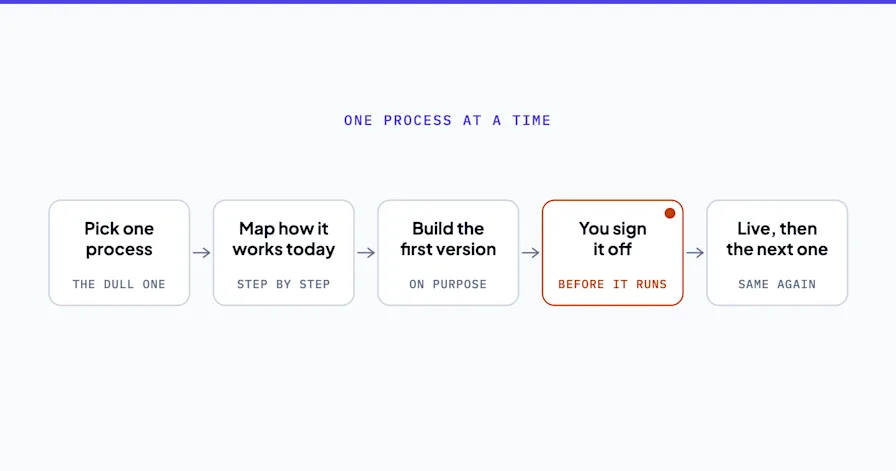
They start with the workflow, not the tool. Before picking any AI tool, they map the actual process. Where does data enter? Where does it leave? Who touches it? What decisions require human judgment? What's purely mechanical? The workflow map is the blueprint. Without it, you're automating in the dark.
They pick one high-ROI workflow first. Not the most interesting automation. Not the most technically impressive. The one that saves the most time or recovers the most revenue. A lead follow-up sequence that runs 20 times per week delivers more ROI than a quarterly reporting dashboard.
They build systems, not automations. Every workflow connects to the next. The lead capture feeds the CRM. The CRM triggers the onboarding sequence. The onboarding sequence generates the invoice. Workflow automation that treats each step as isolated creates new bottlenecks instead of eliminating old ones.
The 6-Week AI Implementation Roadmap for Small Business
This timeline works for businesses with 1-100 employees. It assumes you're starting from scattered AI usage (ChatGPT, maybe Zapier) and moving to a connected system with measurable outcomes.
Weeks 1-2: Audit and Workflow Mapping
Don't touch any tools yet. This is the phase most businesses skip, and it's the reason most AI implementations fail.
What you're doing:
Inventory every repetitive task your team does weekly. Time each one.
Map the data flow: where information enters, where it moves, where it gets stuck.
Identify the handoff points where things fall through cracks (leads that don't get followed up, invoices that sit in draft, onboarding steps that get missed).
Rank every workflow by three criteria: frequency (how often), time cost (minutes per occurrence), and revenue impact (does it touch leads, payments, or retention).
The output: A prioritized list of 3-5 workflows ranked by ROI. The top one becomes your first implementation.
A 6-person HVAC company that went through this exercise found their biggest time drain wasn't scheduling (which they assumed). It was post-service follow-up. Technicians completed jobs and the follow-up email, review request, and invoice went out manually, sometimes 3 days later. That was the workflow worth automating first.
Weeks 3-4: First Workflow Live
Take the #1 ranked workflow from your audit and build it.
What you're doing:
Select tools based on what you already use. If you're on HubSpot, build the automation in HubSpot. If you're on Google Workspace, use Zapier or Make to connect the pieces. Don't introduce new platforms unless absolutely necessary.
Build the automation with a human-in-the-loop for the first two weeks. Automated actions trigger, but a person reviews and approves before execution. This catches errors before they reach customers.
Document the workflow so anyone on your team can understand what it does and troubleshoot if something breaks.
What this looks like in practice: A two-attorney estate planning firm automated their new client intake. Before: a potential client fills out a web form, someone manually checks conflicts, someone emails the engagement letter, someone schedules the initial consultation. After: the form submission triggers a conflicts check against the CRM, generates the engagement letter with pre-populated fields, and sends a calendar link. The attorney reviews and approves. Total time: 4 minutes down from 35.
Weeks 5-6: Measure, Adjust, Expand
Your first workflow has been running for 2 weeks with human-in-the-loop oversight. Now you measure.
What you're measuring:
Time saved per occurrence (compare to your pre-automation baseline from the audit)
Error rate (are automated outputs as accurate as manual ones?)
Team adoption (is your team actually using it, or working around it?)
Customer impact (any complaints? Any improvements in response time?)
What you're deciding: Remove the human-in-the-loop if the error rate is acceptable. Start building workflow #2 from your priority list. Connect it to workflow #1 so data flows between them without manual transfer.
By week 6, you should have one fully automated workflow running independently and a second one in development. That's the foundation.
AI Implementation Budget Tiers for Small Business
One of the most common questions about AI adoption for small business is "how much does this actually cost?" The steps to implement AI don't change based on budget. The tools and support level do. Here's what realistic AI implementation looks like at four different investment levels.
Budget Tier | Monthly Cost | What You Get | Best For |
|---|---|---|---|
DIY | $50-200/mo | ChatGPT Plus/Claude Pro + Zapier/Make + your existing tools | Solo operators or 1-2 person teams with technical comfort |
Guided DIY | $200-500/mo | Same tools + consulting sessions for workflow design | Teams of 3-10 who need architecture guidance but can execute |
Full Implementation | $2,000-5,000/mo | Professional workflow design + build + training + monitoring | Teams of 5-50 who need it done right the first time |
Strategic + Implementation | $5,000-15,000 (project) | AI strategy consulting + full build + custom AI agents | Operations seeking 30%+ overhead reduction with enterprise-grade security |
The DIY tier works for simple, single-tool automations. Connecting a form to a CRM to a calendar. The failure rate increases when you try to build multi-step, multi-tool workflows without understanding how the systems interact.
The full implementation tier is where most businesses with 10+ employees get the best ROI. The cost of the engagement pays for itself within 2-3 months through time savings, and the system is built to scale without breaking.
Common Small Business AI Implementation Mistakes (And How to Avoid Them)
These aren't hypothetical. These are patterns from real small business AI adoption projects.
Automating a broken process. If your current invoicing workflow requires three people to touch the same data in three different systems, automating it doesn't fix the problem. It makes the problem happen faster. Fix the workflow first, then automate.
Starting with the "cool" automation instead of the high-ROI one. Building an AI chatbot is more interesting than automating invoice follow-up. But if 12% of your revenue sits in overdue invoices, the follow-up automation pays for itself in month one. The chatbot might take six months to justify its cost.
Buying a platform before mapping the workflow. "We signed up for [tool] and now we need to figure out what to do with it" is the most expensive sentence in small business AI. The tool serves the workflow. Not the other way around.
No measurement baseline. If you don't time the manual process before automating it, you can't prove the automation works. "It feels faster" doesn't survive a budget review. "35 minutes down to 4 minutes, 20 times per week" does. Every AI implementation plan should start with measuring the current state before touching the future state.
Skipping the human-in-the-loop phase. Letting an automation run unmonitored from day one is how you send a wrong invoice to your biggest client. Two weeks of human oversight catches the edge cases that the workflow design missed.
Trying to automate everything at once. The temptation is real, especially once you see the first workflow working. But launching five automations simultaneously means five things can break simultaneously. Sequential rollout, where each workflow is stable before the next one starts, is how the steps to implement AI actually work in practice. Speed matters, but stability matters more.
Ignoring the team. AI adoption for small business only works when the team uses the system. If your operations manager doesn't trust the automated lead routing, they'll manually check every assignment. That defeats the purpose. Include your team in the audit phase. Show them the time savings. Let them see the system work with human-in-the-loop before going fully automated. Buy-in isn't optional.
What to Do After Week 6: Scaling Your AI Implementation
The first 6 weeks establish the foundation. What happens next determines whether your AI implementation becomes a one-time project or an ongoing operational advantage.
According to the SBA's guide to AI for small business, the businesses seeing the strongest results are the ones that treat AI as infrastructure, not a project. That means a cadence of continuous improvement, not a one-time build.
Month 3-4: Expand to 3-5 connected workflows. Each new automation should connect to an existing one. Lead capture feeds CRM feeds onboarding feeds invoicing. The system compounds.
Month 5-6: Evaluate whether custom AI agents make sense for your operation. A customer support agent that handles 80% of routine inquiries or a lead qualification agent that responds to new inquiries in under 2 minutes. These are the next level beyond workflow automation.
Ongoing: Review automated workflows quarterly. Tools update. Your business changes. Workflows that made sense 6 months ago may need adjustment. Business process automation isn't a one-time project. It's infrastructure that evolves with your operation.
Conclusion
AI implementation for small business doesn't require a massive budget or a technical team. It requires a system. Map the workflow first. Pick the highest-ROI automation. Build it with human oversight. Measure the results. Then expand.
The AI implementation plan that works is the one that starts with your business, not with the technology. Audit your workflows. Identify the time drains. Build the first automation around the highest-ROI opportunity. Measure the results. Then scale.
The 14% of small businesses that have genuinely integrated AI across their operations didn't get there by subscribing to more tools. They got there by designing systems where every workflow connects to the next and the repetitive work happens automatically. Their AI implementation roadmap started with the process, not the platform.
The businesses that struggle aren't failing because AI doesn't work. They're failing because they started with the technology instead of the workflow. The difference between the two groups isn't budget or technical skill. It's approach. And approach is something you can change starting this week.
Ready to find your highest-ROI automation opportunities? Book a free Shortlist Call and get a custom roadmap built for your specific operation, your existing tools, and your team size.
Stephen Angelo
Founder & CEO, OptiWork.ai