Business Process Automation for Small Business: Where to Start
You do not have an IT department. That is what most advice about business process automation for small business quietly assumes you do have. Somebody on staff with the time to judge the tools, map the workflow, and own the thing afterwards, when a vendor changes something and it stops working.
So the honest version of the question is narrower than "should we automate". You already believe automation would help. What stalls the decision is knowing what to automate first: which single process goes at the front of the queue, and how you know it is the right one.
This is the answer to that. What process automation is and is not, the four tests a first automation has to pass, the five workflows worth looking at before any others, the ones to leave alone, and what the work costs when you bring someone in. By the end you should be able to name your first automation out loud and defend the choice, whether you build it yourself or not.
If you would rather work it out in conversation, book your free Shortlist Call. 30 minutes, no cost, and nothing to sign.
What Business Process Automation for Small Business Actually Means
Business process automation (BPA) is software running a repeatable, rules based process end to end, so that the steps happen in order without anyone remembering to do them. A lead arrives, gets acknowledged, gets routed, gets chased. An invoice assembles itself when the job is marked complete. Nobody retypes the same address into a third system.
Two things it is not, and both confusions cost small businesses money.
It is not the same as connecting two apps. A Zap is a trigger and one or more actions, and that is task automation: useful, cheap, and about one step. Process automation is the whole path from the thing that starts the work to the thing that finishes it, including what happens when a step fails and nobody notices.
And it is not AI. Rules are rules. AI reads context and makes a judgment call. They work well together, and most of what a small business should automate first is plain rules that need no model at all. Being precise about which one you are buying is the difference between a quote you can check and a quote you cannot.
Why "What Do I Automate First" Is the Real Question
Most advice on how to automate small business processes starts with the tools. Almost every automation project that gets shelved, though, was shelved for a different reason. Not the tool. The ordering. Automate the wrong step first and the work still piles up one door upstream, so the automation looks like it did nothing and nobody wants to fund the next one.
Without an IT department, the ordering matters more, because you only get one credible attempt. Your people watched you buy the thing. If the first one lands, the second is easy to sell internally. If the first one is a demo that nobody uses, automation becomes the subject everyone changes.
There is also a quieter cost to going first on the wrong process: you learn the wrong lesson. A workflow that was chaotic before automation is still chaotic afterwards, only now it is chaotic at speed and in a system nobody wants to open.
So pick the first one on evidence rather than on enthusiasm. That is what the next section is for.
The Four Tests a First Automation Has to Pass
Run any candidate process through these four. A good first automation passes all four. A process that fails two of them is a second year project.
It happens often. Daily beats weekly, weekly beats monthly. Frequency is what turns a small saving into a real one, and it is also what gives you enough runs to see whether the automation is actually working.
It happens the same way every time. If you can walk a new hire through it without saying "it depends", it is rules based. If every third case needs a decision, you are looking at judgment work with an automatable shell around it. Automate the shell, not the judgment.
A person is currently carrying it. Not a system, a person. Someone is copying, chasing, reminding, reformatting, or checking a box. That person is the measure of what the automation is worth, and they are also the person who will tell you the truth about whether the new version is better.
A mistake is visible and reversible. A misfiled document is a nuisance. A wrong invoice sent to the wrong client is a phone call you do not want. Start where the blast radius is small, learn how your own approvals should work, and only then automate anything that touches money or a customer directly.
There is a fifth question worth asking, though it is not a test: can you describe the process, start to finish, in five minutes? If you cannot, the first piece of work is not automation. It is mapping.
Five Workflows Small Businesses Should Look at First
These five come up most often in owner led businesses, and each one usually passes the four tests. Read them as the standing shortlist for small business workflow automation. The point is not to do all five. It is to recognize yours.
Lead capture and the first reply. Inquiries arrive from a form, an inbox, a phone call, and a chat window, and they sit in different places until somebody gets to them. Automating intake puts every lead in one place, acknowledges it immediately, routes it to the right person, and raises its hand again if nothing has happened. There is a fuller treatment in lead capture automation for small businesses.
Client or customer onboarding. Onboarding is the classic case: many small steps, several systems, one person holding the checklist in their head. Documents get collected, accounts get created, the welcome sequence goes out, and nothing depends on somebody remembering the order. The step-by-step version is in customer onboarding automation.
Quoting, invoicing, and the chase. Cash flow in small businesses is usually a timing problem rather than a revenue problem. Invoices go out late because sending them is somebody's fifth priority, and overdue accounts get chased when someone notices. Both of those are schedules, and schedules are the easiest thing in the world to automate.
Support triage. Requests arrive unstructured. Without a system they queue in a shared inbox until a human sorts them by hand, twice, because the first sort was interrupted. Automated triage classifies and routes, and attaches the context the responder would otherwise go looking for.
The recurring report nobody enjoys. If a person opens four tools every Monday and pastes numbers into a spreadsheet, that is finished work pretending to be a task. It is also the safest automation on this list, because when it breaks, nothing customer facing breaks with it.
If you want the longer list with the reasoning attached, start with which business workflows to automate first.
A Worked Example: Choosing the First One
Take a six person estate planning firm. Three processes are on the table, and the owner wants to know which one goes first.
Candidate one: client intake. New matters arrive by phone and by email. Somebody opens a file, creates a folder, sends an engagement letter, and requests four documents. It happens most days, it runs the same way every time, and a paralegal is carrying it. A mistake means a document gets requested twice, which is awkward and entirely recoverable. That is four tests out of four.
Candidate two: fee quoting. Every matter is priced by the owner after a conversation. It happens often, but it is different every time and the judgment is the product. The shell around it can be automated, the follow up and the record keeping, but the quote itself cannot. Two tests out of four.
Candidate three: the annual client review mailing. Once a year, sizeable, and painful for two weeks. Frequency fails immediately. The build cost is the same as intake and it gets exercised once. One test out of four.
Intake wins, and not because it is the most interesting problem. It wins because it runs often enough to prove itself, it is boring enough to be rules based, a person is visibly carrying it, and nothing embarrassing happens if the first version gets something slightly wrong.
The quoting workflow is the second year project, once the firm knows what its own approval step should look like. The mailing may never be worth building at all, and saying so out loud is part of the work.
This is an illustration rather than a client, and the shape travels: the process you should automate first is rarely the one that annoys you most.
What to Leave Alone, for Now
Saying this plainly is the part most vendors skip.
A process that is broken. Automating a broken workflow does not fix it. It makes it break faster, in a system that is harder to argue with. Fix the sequence by hand first, live with the fixed version for a couple of weeks, then automate what survived.
Anything that needs judgment on every case. Pricing a non standard job, handling a delicate client conversation, deciding what to do about a supplier who let you down. These get better with better information, not with automation.
Work that only happens a few times a year. The build cost is the same and the return is not there. Write it down instead, so it does not live in one person's memory.
A process nobody can describe. If three people give you three different accounts of how it runs, automation will simply encode whichever version you happened to hear first. Map it. That mapping is often the whole fix, and it costs nothing.
The thing you are most excited about. Enthusiasm is a poor test and a very good tie breaker. Use it to choose between two candidates that both passed the four tests, never to skip them.
How to Run the First One Without an IT Department
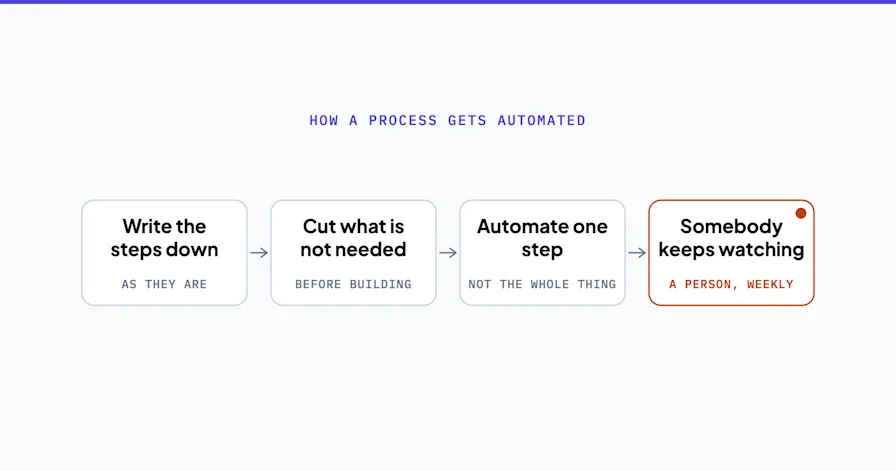
Map it with the people who do it. Not how it should work. How it does work, including the workaround somebody invented in 2023 that everything now depends on. A whiteboard and the two people closest to the work beats a formal process document.
Give it an owner. One person inside the business who wants this to work. They do not need to be technical. They need to care whether the thing is used in six weeks.
Build one, not five. Sequential rollouts let people adjust and give you something real to judge the next decision on. Parallel rollouts produce confusion and a quiet return to the old way.
Test it on cases that already happened. Run last month's real work through it before anything goes live. This is how a build gets tested here: against real historic cases, not against tidy examples invented for the demo.
Keep a person in front of anything that reaches a customer. Where a decision has consequences, the right shape is that the system prepares the work and stops. It drafts, a person approves, it sends. That is the default rather than a premium option, and it is what keeps automation from becoming the thing your customers complain about.
Decide who can see what before you connect anything. Automation means giving software access to your CRM, your inbox, and often your accounting system. Least privilege, real password hygiene, and a record of which tool holds which key. The NIST Small Business Cybersecurity Corner is a free, plain place to start if nobody in the business owns this question yet.
Expect the vendors to move. Software changes underneath working automations. Something will break that you did not touch. Decide up front whether you are watching for that yourself or paying someone to watch for it.
What Business Process Automation for Small Business Costs
Two costs, and they behave differently.
Tooling is the smaller one and the one owners overestimate. The platforms that connect ordinary business software are inexpensive at small volumes, and plenty of first automations run on a plan you already pay for.
The real cost is the design and the build. Working out what the process should be, connecting systems that were never meant to talk, and handling the failure cases. A silent break should not be the first you hear of it. Doing that yourself costs your time rather than your money. Bringing someone in makes it a line item.
OptiWork publishes what that line item is, which most of this field will not do. The prices are on one page: a written roadmap is a fixed $4,500, and the whole of it comes off the cost of a build if you start one within 90 days. Business process automation builds start at $12,000, custom AI agents at $20,000, and optional ongoing support at $500 per month once something is live. Every project is quoted at a fixed figure before it starts, with no hourly meter.
What you actually get back is the part nobody should quote at you from a blog post. It depends on your volumes and on how much of the work is genuinely repeatable, and the arithmetic belongs on your numbers rather than on an average. That is precisely what the roadmap does before any build is agreed.
And if you have your own engineers and a written specification, none of this is for you. You want a developer, and it will cost less.
Business Process Automation for Small Business Starts With One Workflow
Pick the process that happens often, runs the same way every time, is currently carried by a person, and cannot embarrass you when it goes wrong. Map it with the people who do it. Build that one. Watch it for a month. Then choose the next one on evidence rather than on instinct.
That is the whole method, and it is deliberately unglamorous. Business process automation for small business fails far more often on ordering and on ownership than on technology, which is good news, because ordering and ownership are things you control.
If you want a second opinion on which process should go first, book your free Shortlist Call. 30 minutes, and you leave with the two or three processes most worth automating, in order. If the honest answer is that a process change fixes it for nothing, that is the answer you get.
Stephen Angelo
Founder & CEO, OptiWork.ai